 EN
EN  SV
SV Before you begin: open Settings → MCP in AlmRecorder. If that section is missing, install a newer release that includes MCP support. There is no separate server package.
Install a version with MCP
For a normal install, download a release whose notes explicitly list MCP support, drag AlmRecorder.app to Applications, and open it. If the app has Settings → MCP, the bridge is already installed inside it; there is no second server package.
Keep AlmRecorder in Applications after setup. Each connected client stores the bridge’s absolute path, so moving the app later can break the connection.
Choose your client
The copied AlmRecorder configuration is not universal. Claude Desktop, Cursor, and Antigravity use mcpServers; OpenAI’s ChatGPT desktop and Codex clients use TOML; GitHub Copilot CLI adds its own fields; Visual Studio Code uses a servers object. Choose a page and follow one complete recipe.
Prepare AlmRecorder first
- Move AlmRecorder.app to Applications before copying anything. The generated command contains the app’s current absolute path.
- Open sensitive recordings and turn off Allow MCP clients to access this recording. Privacy tags can hide whole categories.
- Open Settings → MCP. Keep Allow content, notes, comments, summaries, and transcript search and Allow tags, notes, and comments to be changed off for the first connection.
- Turn on Enable local MCP server, wait for Listening on …, then choose Copy configuration.
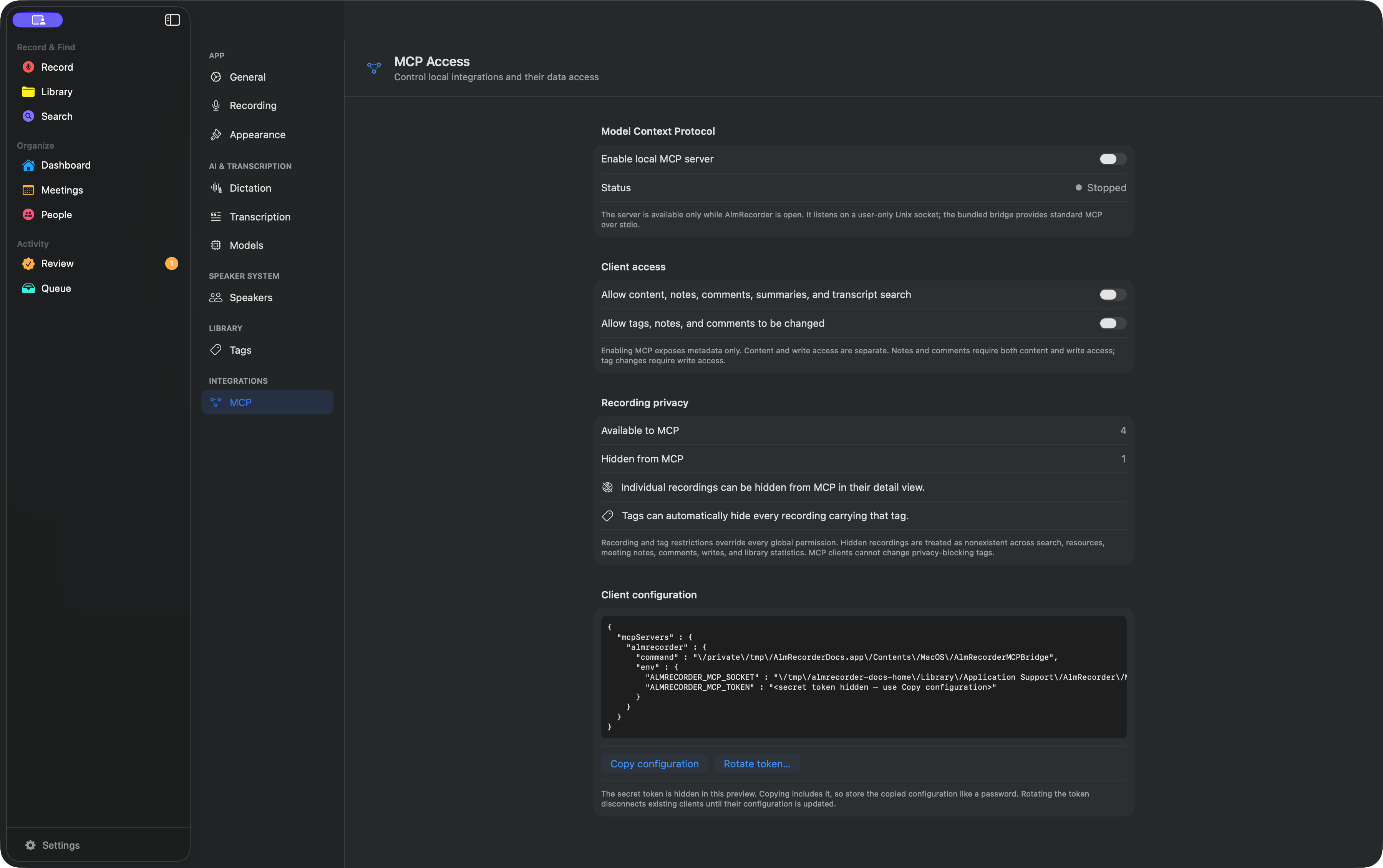
The token is copied—not revealed
AlmRecorder intentionally masks the real token in the on-screen preview. There is no visible token field to hunt for.
- Open Settings → MCP in AlmRecorder.
- Turn on Enable local MCP server and wait until Status says Listening on ….
- Choose Copy configuration. The clipboard now contains the command, socket, and real ALMRECORDER_MCP_TOKEN.
Paste the configuration directly where this guide tells you. Treat it like a password and clear the clipboard after the connection works.
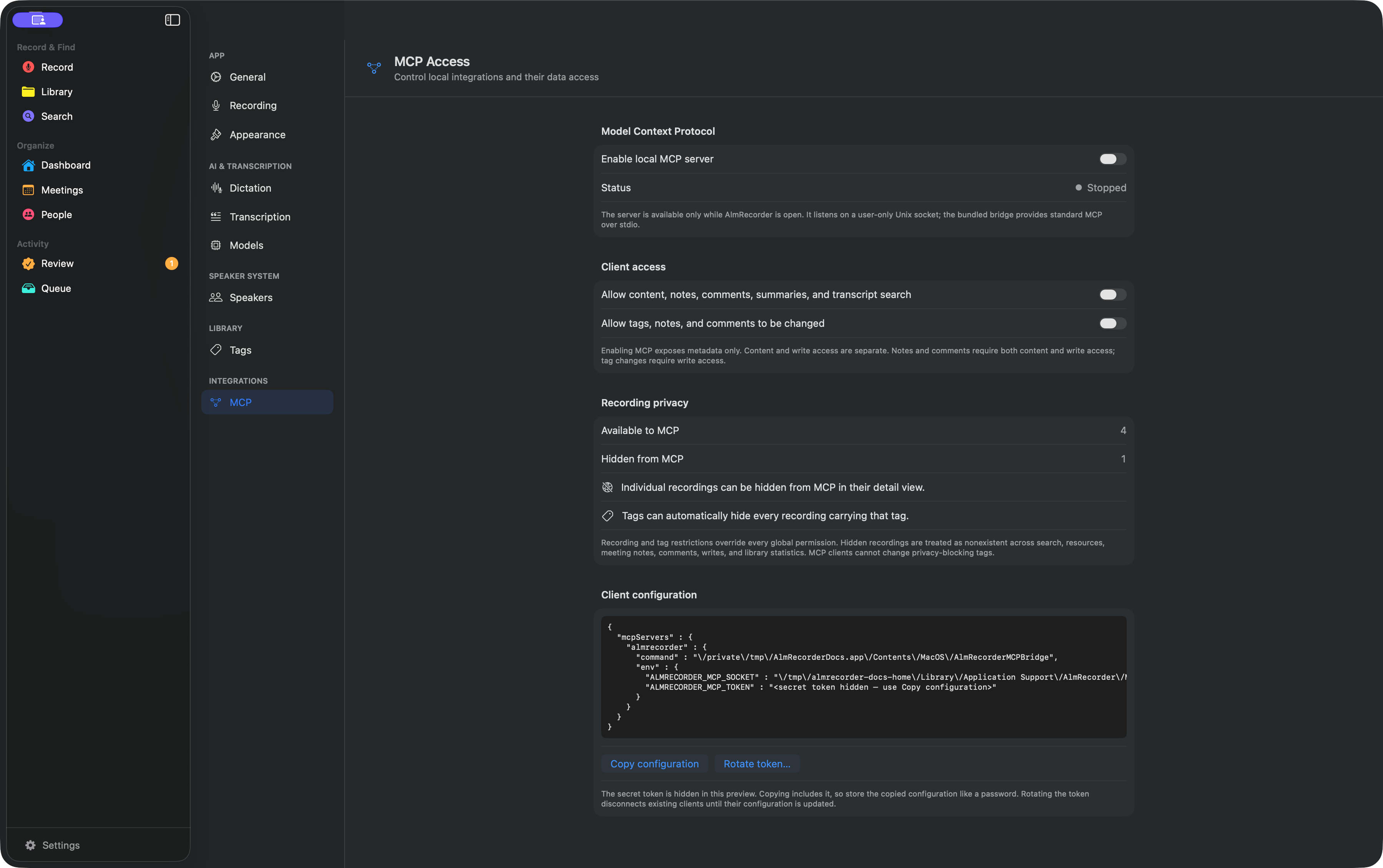 Choose Copy configuration
The copied block contains a secret token. Treat it like a password: do not commit it, paste it into a support issue, or leave it in clipboard history.
What a compatible client needs
A compatible client must run on the same Mac and support a local stdio MCP server with environment variables. AlmRecorder is not a URL-based remote connector, so web-only agents and clients that accept only HTTP or SSE cannot use this bridge.
The client launches AlmRecorderMCPBridge; the bridge forwards authenticated requests to the open app. Seeing AlmRecorder in a tools list confirms the configuration was found, but the connection is ready only after a read-only library status request succeeds.
Start small, expand deliberately
With only the server enabled, the client can browse permitted metadata such as titles, dates, speakers, sources, and tags. Turn on Content only for transcript search, summaries, notes, and comments. Turn on Writes only when the client should change tags; notes and comments need both grants.
All configured clients currently share one token and the same global grants. To stop access, disable the server. To invalidate every copied configuration, rotate the token.