
 EN
EN  SV
SV Before you begin: confirm that AlmRecorder has Settings → MCP. If it is missing, install a version with MCP support.
Let your agent handle the setup
Copy the complete task, paste it into your agent, then append AlmRecorder’s copied configuration. The secret token is included only when you paste it yourself.
Preview the instructions
Configure AlmRecorder as a local MCP server for my local MCP client on this Mac.

Work carefully and perform the setup for me if you have filesystem and terminal access. If you cannot edit local files, return the exact ready-to-paste file change and tell me where it belongs.

1. First confirm that AlmRecorder shows Settings → MCP, is in its final app location, and is open.
2. Ask me to enable Enable local MCP server, wait for Listening on …, and choose Copy configuration.
3. I will append the copied JSON configuration below this task. Ask me for it if it is missing.
4. Treat ALMRECORDER_MCP_TOKEN like a password. Never repeat it in your response, log it, or put it in Git, a support issue, or a shared project file.
5. Identify the client’s global private configuration file. Map server name almrecorder, stdio transport, the copied command, no arguments, and both copied environment variables. Never place the token in a shared project file.
6. Use the exact command, ALMRECORDER_MCP_SOCKET, and ALMRECORDER_MCP_TOKEN copied from AlmRecorder. The transport is local stdio and AlmRecorderMCPBridge takes no arguments.
7. Do not alter or delete any other client settings. Show a diff or describe exactly what changed.
8. Reload or restart the client’s MCP servers.
9. Ask the agent to call get_library_status and report the recording count. Then call list_recordings with limit: 1. Do not change anything.
10. Do not enable AlmRecorder’s content or write permissions. I will choose those myself after the read-only check succeeds.

ALMRECORDER COPIED CONFIGURATION:
[Paste Copy configuration from AlmRecorder here]
Check compatibility first
Your client must run on the same Mac and be able to:
- launch a local executable as an MCP server;
- communicate over standard input/output (stdio); and
- pass environment variables to that process.
If the client asks for a URL, OAuth connection, HTTP, SSE, or Streamable HTTP only, it cannot connect to AlmRecorder’s local bridge.
Prepare and map the values
Put AlmRecorder in its final location and keep it open. On every sensitive recording, turn off Allow MCP clients to access this recording; use Hide from MCP on privacy tags. In Settings → MCP, leave content and changes permissions off, turn on Enable local MCP server, wait for Listening on …, and choose Copy configuration.
The token is copied—not revealed
AlmRecorder intentionally masks the real token in the on-screen preview. There is no visible token field to hunt for.
- Open Settings → MCP in AlmRecorder.
- Turn on Enable local MCP server and wait until Status says Listening on ….
- Choose Copy configuration. The clipboard now contains the command, socket, and real ALMRECORDER_MCP_TOKEN.
Paste the configuration directly where this guide tells you. Treat it like a password and clear the clipboard after the connection works.
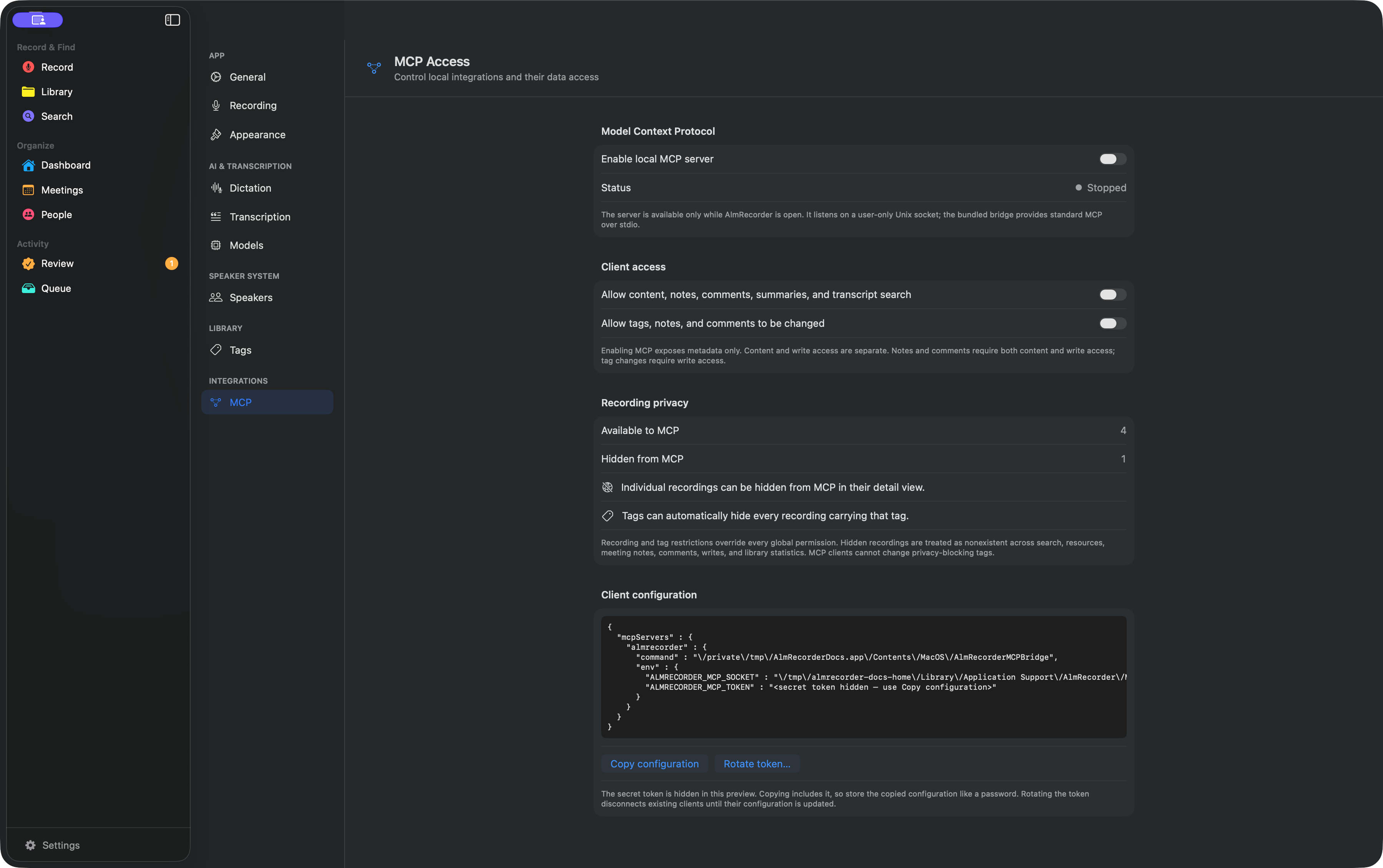 Choose Copy configuration
Permission boundary: Allow content, notes, comments, summaries, and transcript search unlocks those reads. Allow tags, notes, and comments to be changed unlocks tag changes; notes and comments require both grants. Start with neither.
Map the copied values into the client’s local-server form:
| Client field | AlmRecorder value |
|---|---|
| Server name | almrecorder |
| Transport/type | stdio |
| Command | copied command value |
| Arguments | none |
| Environment | copied ALMRECORDER_MCP_SOCKET and ALMRECORDER_MCP_TOKEN |
Clients using the common JSON shape can merge the copied almrecorder entry under mcpServers. Clients using TOML or YAML need the same fields expressed in that syntax. Never publish the token or put it in a shared project file.
Reload or restart the client after saving. Keep AlmRecorder open whenever the client uses it.
Check the connection
Ask the client:
Use AlmRecorder’s
get_library_statustool and report the recording count. Then calllist_recordingswithlimit: 1. Do not change anything.
When the status response returns, the client is connected to the open app. Only then enable transcript content or changes if that client needs them.
If it fails
Check the client’s server logs for a missing executable, missing token, unauthorized token, or unavailable app. Then confirm the app has not moved, AlmRecorder’s server is enabled, and both environment variables exactly match the latest copied configuration.
For clients on another computer or web-only agents, there is no supported connection path today.
To disconnect this client, remove its almrecorder server entry and restart it. To revoke every copied configuration immediately, disable the server or rotate the token in AlmRecorder.
Choose a tested client guide · Privacy in AlmRecorder · MCP contract reference